Burning Bridges CapCut Template: Where to Find It and What It Makes
Where the Burning Bridges AI CapCut template is, how to use it step by step, what it cannot do, and how to get the longer 15-second cut on a computer.
 Burning Bridges AI
The short answer. The Burning Bridges CapCut template is free, lives in the phone apps, and turns one photo into a 10.6-second clip of the chandelier party scene with you as the lead. You reach it from a TikTok video that carries the template link. It cannot make a longer clip and it does not work on a computer. For the 15-second cut, which adds the turn to the crowd, Burning Bridges AI makes it from one photo in a browser in about five minutes, paid once with no subscription.
Updated October 13, 2026.
Where to find it
The reliable way in is through TikTok:
- Open TikTok on your phone and search "Burning Bridges AI".
- Open a video made with the template. Videos made this way carry a CapCut template link.
- Tap the link to open the template in CapCut.
The template is in the phone apps. That is why many people who look for it on a computer never find it.
How to use it
- Open the template from the link.
- Choose one photo. A clear face, looking at the camera, works best.
- Let it render and check the result.
- Save it, then post it with the song from the TikTok or Instagram sound library.
It costs nothing.
What the template makes
- Length: 10.6 seconds. It covers the scene from the arm out and the walk up to the camera, through the cup and the pointing, to the collar grab.
- Input: one photo.
- Shape: 16:9, like the music video. Most people place it inside a vertical frame before posting.
- Sound: you add the song when you post.
By the time we looked, the template had been used tens of thousands of times, which is a large part of why the trend spread as fast as it did.
What it cannot do
- It is fixed at 10.6 seconds. The turn to the crowd comes right after that point and is not in it.
- It is phone only. There is no version of it for a browser.
- You cannot change the scene. The template does one thing.
- Results vary with the photo. A side-on face or a busy background often comes out wrong, and the only fix is to try another photo.
If you want the longer cut
The versions that run 15 seconds or more are not made with the template. They come from AI video tools that follow the same scene for longer.
Burning Bridges AI makes the 15-second cut from one photo in a browser, on a phone or a computer. You upload the photo, pay once, and download a 16:9 MP4 about five minutes later. It is a paid tool with no subscription, and the file is silent so that you add the sound yourself.
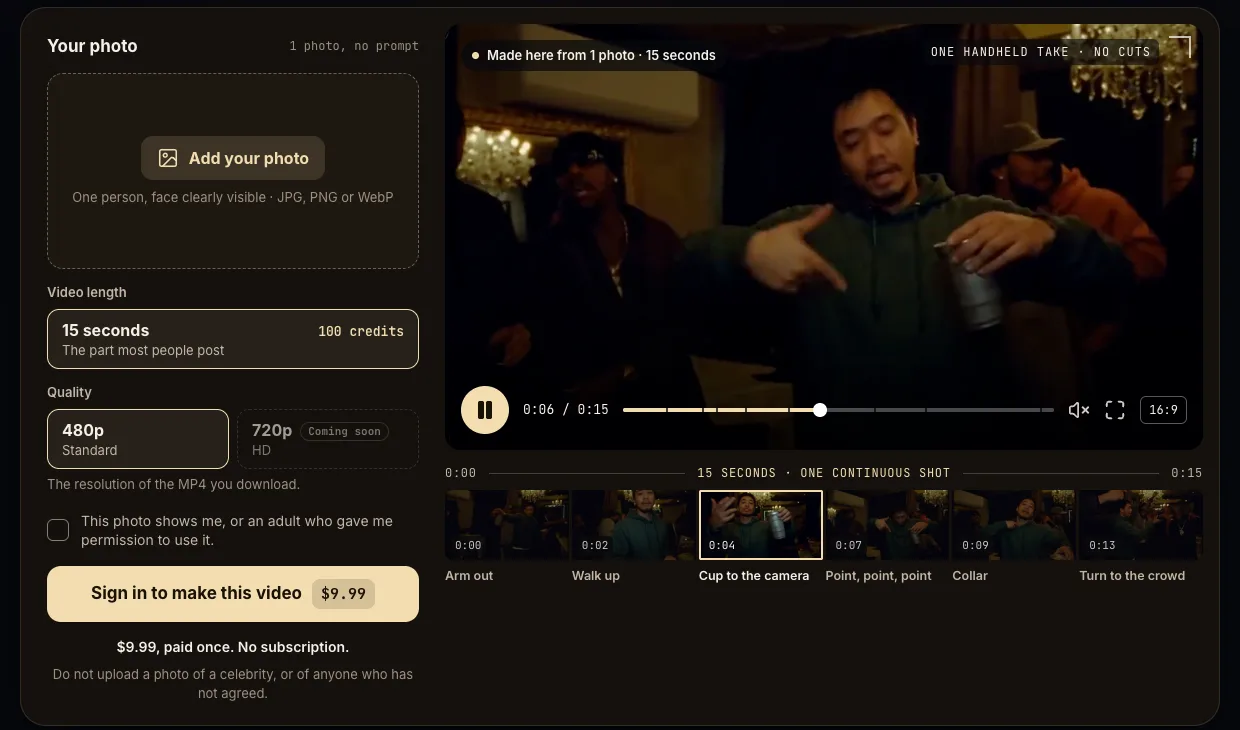
If 10.6 seconds is enough for what you want to post, the template is the right choice and it is free. If you want the part of the scene after the collar grab, or you are working on a computer, use a tool that makes the longer cut.
Template or longer cut: a quick guide
- You want the clip everyone has seen, today, for nothing: the template.
- You want the turn to the crowd at the end: a 15-second cut. The template stops just before it.
- You are on a laptop or a desktop: a browser tool. The template is not there.
- You want to change the room or swap in a character: neither. That takes a general AI video app, a reference clip and a prompt.
Tips for the photo
These apply to the template and to any other route:
- One person, facing the camera, in even light.
- Head and shoulders or waist-up.
- No sunglasses, masks or heavy filters.
- A plain background helps.
- If the first result looks wrong, change the photo before you change anything else.
Common questions
Is the template official? No. It was made by a CapCut template creator, not by the artist or his label.
Why does the link not open? You are probably on a computer, or CapCut is not installed. Open the TikTok video on your phone.
Can I use a photo of someone else? Only with their permission, and never a photo of a celebrity.