Burning Bridges AI Video Generators Compared: Which Way Fits You
The ways to make the Burning Bridges AI video, compared by cost, length, device and effort: the CapCut template, general AI video apps and one-scene sites.
 Burning Bridges AI
The short answer. There are three kinds of Burning Bridges AI video generator. The CapCut template is free and makes a 10.6-second clip from one photo, on a phone only. General AI video apps such as Higgsfield can make any length, but you supply the clip of the scene and a prompt. One-scene sites take a photo and return a finished cut: Burning Bridges AI makes a 15-second 16:9 MP4 from one photo in about five minutes, paid once with no subscription. Use the template for the short clip, a one-scene site for the longer cut, and a general app if you want to change the scene.
Updated October 13, 2026. We run one of the one-scene sites, so read this with that in mind. What we say about other tools comes from their own pages, read on October 11, 2026.
The short version
- Free and fast, 10.6 seconds, phone only: the CapCut template.
- Most control, most work: a general AI video app with a reference clip and a prompt.
- One photo, a 15-second cut or longer, any device, paid: a site built for the scene.
The CapCut template
- Cost: free.
- Length: 10.6 seconds.
- Device: phone, through TikTok and CapCut.
- Input: one photo.
- Effort: a few taps.
This is what most of the clips on TikTok were made with. Its limits are the fixed length and the phone. If 10.6 seconds of the scene is enough, nothing else is as quick. We wrote up where to find the template and how to use it.
General AI video apps
- Cost: credits or a subscription, depending on the app.
- Length: whatever the app allows for a reference clip, often up to about 30 seconds.
- Device: browser or app.
- Input: the clip of the scene, a photo of the person and a written prompt.
- Effort: the most of the three.
With these you do the work yourself. You bring the clip, upload it as the motion reference, add a photo and describe what should change. You can choose the length, swap in a character instead of a person, or change the room.
Two things to know before you start. First, you may need several renders before the face and the cup come out right, and each render uses credits. Second, some video models refuse a reference video that shows real people, so the upload may be turned down before anything renders. If that happens, use another route rather than altering the clip to get past the check.
Sites built for this one scene
- Cost: paid per video. On the sites that listed a price when we checked, one video cost roughly $7.50 to $10.
- Length: 15 to 29 seconds, depending on the site.
- Device: any browser.
- Input: one photo. Some also take photos of friends.
- Effort: upload, pay, wait.
These exist because the template stops at 10.6 seconds and lives on phones. They differ from each other in a few ways worth checking before you pay:
- Length and shape. Some make a 16:9 clip like the music video. Others make a vertical one.
- Sound. Some put the song in the file. Others give you a silent file and leave the sound to the app you post in.
- How you pay. Most sell credits in packs. Check how many credits one video uses and whether the credits expire.
- Wait time. About five to ten minutes is typical.
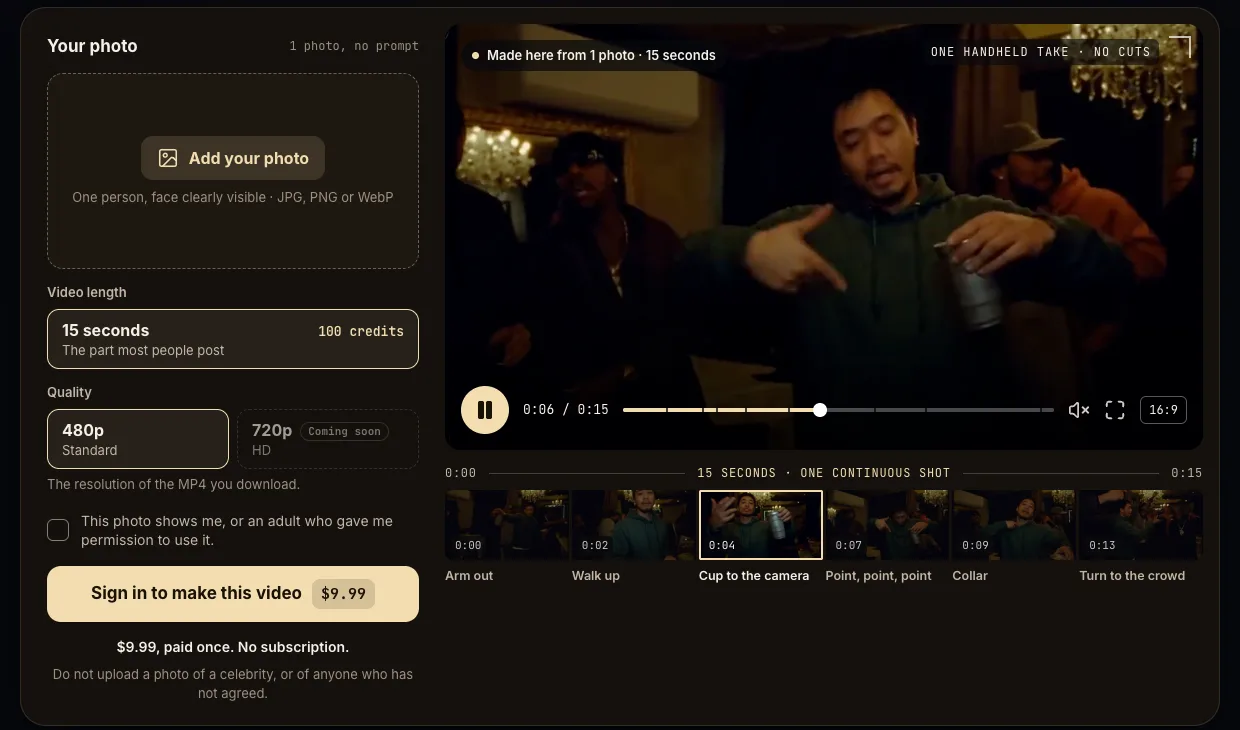
Burning Bridges AI is one of these. It takes one photo and makes a 15-second 16:9 MP4 in about five minutes. You pay once, there is no subscription, and the file is silent so the song comes from the TikTok or Instagram sound library when you post.
Each tool in a sentence or two
What follows is taken from each tool's own pages as we read them on October 11, 2026. Prices and limits change, so check before you pay.
- CapCut template. Free, one photo, 10.6 seconds, in the phone apps. You reach it from a TikTok video that carries the template link.
- Higgsfield. A general AI video app. The tutorials for this trend use its motion-transfer feature with a reference clip of 4 to 30 seconds and a photo of the person.
- Summrs. Takes a photo or a video. Its demo for this trend is a 20-second 16:9 clip. New accounts get 50 credits, more cost $5 for 50, and its templates start at 10 credits.
- Starrd. One photo of a person or a pet. It makes a 20-second vertical clip in 480p with the song in the file, for 150 credits, about $7.50.
- East. One photo of a person. It makes a 15-second 16:9 clip in about ten minutes. We did not find a price on its pages.
- Burning Bridges AI. One photo of a person. It makes a 15-second 16:9 MP4 in 480p in about five minutes, silent, paid once with no subscription. This is our site.
Is there a free Burning Bridges AI video generator?
The CapCut template is free and has no catch beyond its length. Among the paid tools, some give a new account a few credits, which may cover one short render. None of the one-scene sites we looked at makes the 15-second cut for free, and ours does not either.
Do you need an app?
Only for the template, which lives in TikTok and CapCut on a phone. The other tools here run in a browser, on a phone or a computer, and give you a video file to download and post.
How to choose
Start from what you want to post.
- The same 10.6 seconds everyone has seen, from your phone. Use the template. Paying for anything else makes no sense here.
- A longer cut that goes on to the turn to the crowd. The template stops just before it. Use a one-scene site, or a general app if you want to do it yourself.
- A cartoon character, a pet or a different room. Use a general AI video app. One-scene sites, ours included, keep the scene as it is.
- You are on a computer. The template is out. Either of the other two works.
Whichever you choose, use a photo of yourself or of an adult who agreed, and leave celebrities out of it.
For the steps of each route, see how to make the Burning Bridges AI video.